Turn Off Screen - Screen Lock26.09.14
Publisher Description



One tap to lock screen - no power button needed. Floating button, widget & icon.
Want a faster, easier way to lock your screen without pressing the power button?
Turn Off Screen (Screen Lock)
lets you lock and turn off your phone screen with just one tap - including a
floating button
that stays on top of all apps.
Well-optimized
for almost every manufacturer.
Trusted by over 1 million users worldwide. Perfect for large-screen phones, one-handed use, or anyone who wants a more convenient screen lock - no physical button press needed.
FEATURES
•
One tap to lock and turn off screen instantly
•
Floating Button
,
Widget
,
Quick Settings Tile
,
Home Screen Icon
&
Notification Panel
- multiple ways to lock from anywhere
• Works seamlessly with
fingerprint sensor
and
Smart Lock
(bluetooth, trusted devices, face, location...) - lock immediately on Android 9+ without requiring a PIN/password to unlock.
•
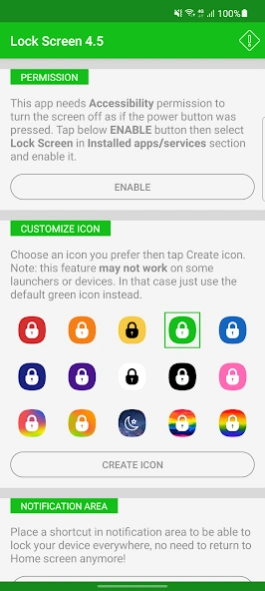
Various icon colors
to choose from (red, orange, yellow, green, blue, indigo, purple, white, black, pink...)
•
Adaptive icon
(Android 8+) and
Dark theme
support (Android 9+)
• Works flawlessly on
foldable phones
• Well-optimized for every manufacturer: Samsung, Xiaomi, OPPO, Vivo, Realme, Huawei, Google Pixel...
• Supports multiple languages and RTL layout:
🇺🇸 🇸🇦 🇧🇩 🇨🇳 🇹🇼 🇳🇱 🇫🇷 🇩🇪 🇮🇳 🇮🇩 🇮🇹 🇯🇵 🇰🇷 🇲🇲 🇮🇷 🇵🇱 🇧🇷 🇵🇹 🇷🇺 🇪🇸 🇹🇭 🇹🇷 🇵🇰 🇻🇳
MULTIPLE WAYS TO LOCK
•
Floating Button
- always visible, tap to lock, drag anywhere you want
•
Home Screen Icon
- tap the icon to turn off screen instantly
•
Widget
- place a screen lock widget anywhere on your screen
•
Notification Panel
- swipe down and tap to lock screen quickly
•
Quick Settings Tile
- pull down the shade and tap to lock in one motion
WHY 1M+ USERS CHOOSE THIS APP?
•
Skip the physical button press
- lock screen from anywhere, instantly
•
Perfect for large phones
- no more stretching to reach the corner button
•
Ultra-light
- no battery drain, no memory usage
•
Free
- full features, no limitations
HOW TO USE
1. Install and grant permission as guided
2. Enable the floating button or place the lock icon on your home screen
3. One tap - screen off and locked immediately
4. Unlock normally with fingerprint, password, or face recognition
PERMISSION
Android 9+
: Requires
Accessibility permission
to lock screen like pressing the power button. Note: don't kill the app to avoid re-granting permission.
Android 8 and below
: Uses
Device Administrator permission
. To uninstall, tap
Deactivate
in app settings first.
SUPPORT
Open the app →
FAQ
→
Feedback and bug report
to email the developer.
About Turn Off Screen - Screen Lock
The company that develops Turn Off Screen - Screen Lock is redmanit. The latest version released by its developer is 26.09.14.
To install Turn Off Screen - Screen Lock on your Android device, just click the green Continue To App button above to start the installation process. The app is listed on our website since 2026-09-14 and was downloaded 3 times. We have already checked if the download link is safe, however for your own protection we recommend that you scan the downloaded app with your antivirus. Your antivirus may detect the Turn Off Screen - Screen Lock as malware as malware if the download link to com.redmanit.lockscreen is broken.
How to install Turn Off Screen - Screen Lock on your Android device:
- Click on the Continue To App button on our website. This will redirect you to Google Play.
- Once the Turn Off Screen - Screen Lock is shown in the Google Play listing of your Android device, you can start its download and installation. Tap on the Install button located below the search bar and to the right of the app icon.
- A pop-up window with the permissions required by Turn Off Screen - Screen Lock will be shown. Click on Accept to continue the process.
- Turn Off Screen - Screen Lock will be downloaded onto your device, displaying a progress. Once the download completes, the installation will start and you'll get a notification after the installation is finished.
Program Details
System requirements
Download information
Pricing
Version History
version 26.09.14
posted on 2026-09-14
- New feature: support floating button, something like Assistive Touch
- Update UI
- Fix Quick setting tile issue
- Fix crash when enabling notifications
version 8.0
posted on 2026-04-04
- New feature: support floating button, something like Assessive Touch
- Update UI
- Fix Quick setting tile issue
version 7.0
posted on 2026-03-28
- Ad-free version
- Monochrome app icon support: You can now choose a monochrome version of your app icon to better match system themes and improve accessibility.
- Android 16 compatibility: This update ensures your app runs smoothly on the latest version of Android.
version 6.6
posted on 2024-09-03
- Ad-free version
- Monochrome app icon support: You can now choose a monochrome version of your app icon to better match system themes and improve accessibility.
- Android 14 compatibility: This update ensures your app runs smoothly on the latest version of Android.
version 6.1
posted on 2024-04-17
- Monochrome app icon support: You can now choose a monochrome version of your app icon to better match system themes and improve accessibility.
- Android 14 compatibility: This update ensures your app runs smoothly on the latest version of Android.
version 5.9
posted on 2024-03-19
- Bring back the notification shortcut for Android 13 and 14 (notification permission required)
- You can now long click on Lock icon to open Settings Screen (some launchers don't support this feature)
version 5.8
posted on 2024-01-05
🟢 Version 5.2
- Remove default (green) icon if another icon is created
🟢 Version 5.1
- Support accessibility button as requested (android 11 and below only)
🟢 Version 5.0
- Support Android 12
- More widget icons
- Another workaround for those who are asked for permission multiple times
🟢 Version 4.5
- Add more colorful icons
- Workaround for some devices that keeps asking for permission
version 5.1
posted on 2022-04-25
🟢 Version 5.1
- Support accessibility button as requested (android 11 and below only)
🟢 Version 5.0
- Support Android 12
- More widget icons
- Another workaround for those who are asked for permission multiple times
🟢 Version 4.5
- Add more colorful icons
- Workaround for some devices that keeps asking for permission
version 5.0
posted on 2021-12-01
🟢 Version 5.0
- Support Android 12
- More widget icons
- Another workaround for those who are asked for permission multiple times
🟢 Version 4.5
- Add more colorful icons
- Workaround for some devices that keeps asking for permission
version 4.5
posted on 2021-11-21
Version 4.5
- Add more colorful icons
- Workaround for some devices that keeps asking for permission
Version 4.4
- Fix bug that can't lock from widget on some devices
- Add more widget icons
- Fix bug that can't lock on some devices (Xiaomi, Huawei...)
- Add various icons
- Support dark theme for Android 9+. App theme will follow system theme.
- Support foldable phone
